$ claude-ntfy-hook
v0.1 MIT single file zero deps ~140 lines of python

Approve Claude Code prompts
from your phone

A PermissionRequest hook that pushes pending tool calls to your phone via ntfy. Tap Allow and the harness skips the local prompt. Tap Deny and the call is rejected. Don't tap — the local terminal prompt fires as if no hook existed. Worst case it's a no-op.

claude · zsh step 1 / 3
> write the text "ntfy test" to /tmp/claude-ntfy-test.txt Write(/tmp/claude-ntfy-test.txt) └─ pushing to phone for approval… └─ Allowed by PermissionRequest hook └─ Wrote 1 lines to ../../../tmp/claude-ntfy-test.txt >
ntfy · android step 2 / 3
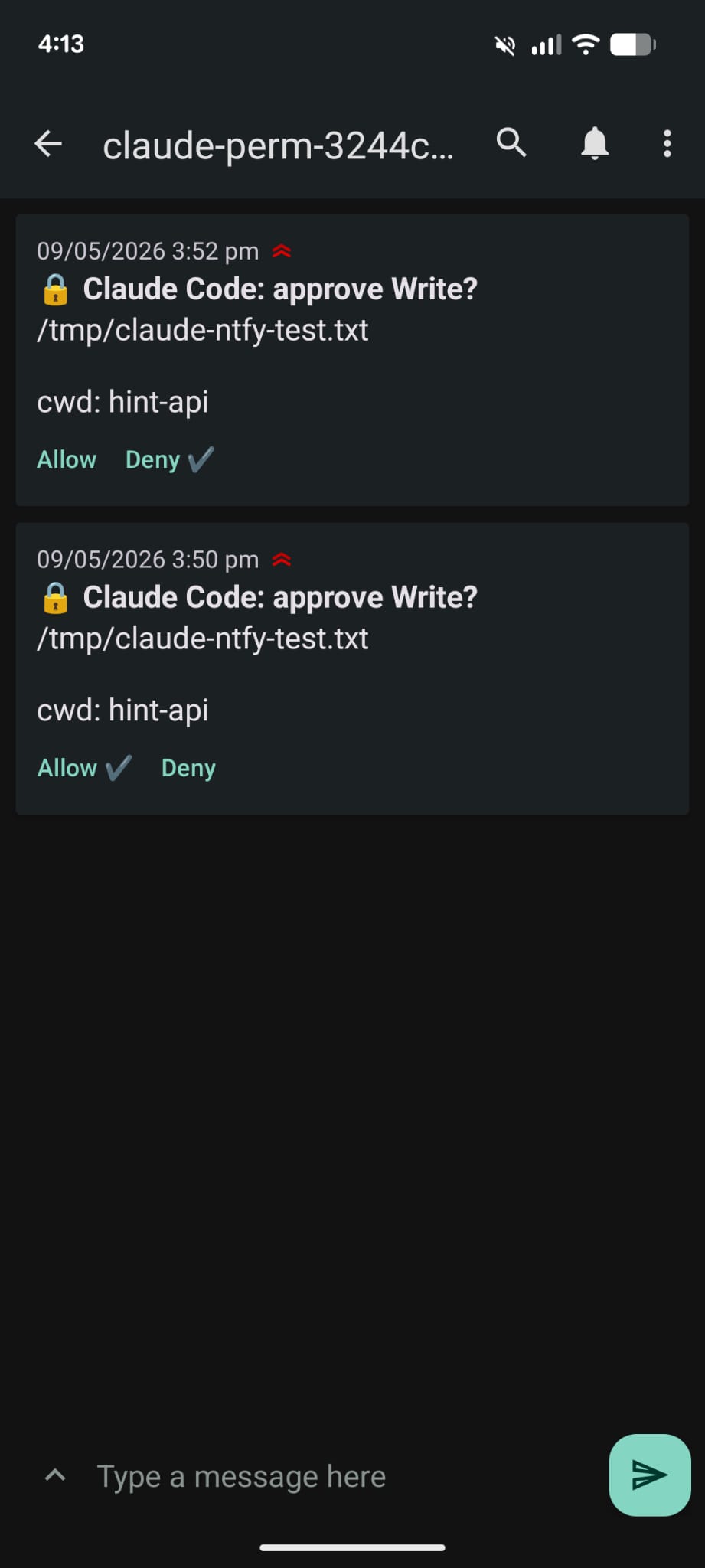
ntfy notification on Android with Allow and Deny action buttons
[1] Claude Code wants to run a tool PermissionRequest event fires [2] hook publishes to ntfy.sh/<perm-topic> with Allow / Deny / Always action buttons [3] you tap on phone hook reads the response, returns decision JSON [•] no tap within 30s? hook exits silent, native terminal prompt fires.

why this exists

Anthropic ships Claude Code Remote Control, which mirrors a CLI session to the Claude mobile app or claude.ai/code. It's great for monitoring — but the docs are explicit that interactive terminal pickers and permission prompts are local-only. If your laptop is asking "Allow this Bash call?", you have to walk back to it.

claude-ntfy-hook fills exactly that gap. It hooks into the PermissionRequest event, posts the pending decision to your phone over ntfy, and waits for a tap. Allow runs the tool. Deny rejects it. Always runs it AND appends a conservative pattern to your permissions.allow so future identical calls auto-approve. No tap — the regular terminal prompt fires. Risky-looking commands (rm -rf, git push --force, curl … | sh) get urgent priority and a 🚨 tag.

Built for engineers running long Claude Code sessions and not wanting to camp the keyboard for every Write, Bash, or destructive call. ~140 lines of Python, no daemon, no server. Public ntfy.sh by default; self-hosted ntfy supported via NTFY_BASE if you'd rather not transit Heckel's servers.


install

Three things to set up: clone the repo, generate two random ntfy topic names, wire the hook into ~/.claude/settings.json. The included install.sh handles the first two.

1

Clone & bootstrap

install.sh symlinks the hook into ~/.claude/scripts, generates two random topic names, and writes them to .env.topics (gitignored).

git clone https://github.com/adrian-gomez/claude-ntfy-hook.git ~/code/claude-ntfy-hook
cd ~/code/claude-ntfy-hook
./install.sh
2

Subscribe on your phone

Install ntfy on Android (or the iOS app), tap Subscribe, paste the NTFY_PERM_TOPIC value from .env.topics, server https://ntfy.sh. Smoke test:

source .env.topics
curl -d "if you see this, ntfy works" https://ntfy.sh/$NTFY_PERM_TOPIC
3

Wire into Claude Code

Source the topics from your shell rc and merge this PermissionRequest entry into ~/.claude/settings.json alongside any other hooks you have.

echo '[ -f ~/code/claude-ntfy-hook/.env.topics ] && source ~/code/claude-ntfy-hook/.env.topics' >> ~/.zshrc
{
  "hooks": {
    "PermissionRequest": [
      {
        "matcher": "",
        "hooks": [
          {
            "type": "command",
            "command": "python3 ~/.claude/scripts/ntfy_permission.py",
            "timeout": 60
          }
        ]
      }
    ]
  }
}

Open a new terminal so Claude Code inherits the env vars, then ask it to do something a notification-worthy. write "hi" to /tmp/foo works.

behavior

The hook fires only when Claude Code was about to actually prompt you (the PermissionRequest event — not for every tool call). Auto-allowed patterns and the safe-command classifier stay silent.

tap allow

Tool runs, no local prompt

Hook returns {"behavior": "allow"}. Claude Code records "Allowed by PermissionRequest hook" in the trace and proceeds.

tap deny

Tool is rejected

Hook returns {"behavior": "deny"}. Claude Code denies the call and surfaces the hook's reason.

tap always

Allow now + auto-approve in future

Hook allows the call AND atomically appends a conservative pattern to ~/.claude/settings.json permissions.allow. Bash patterns narrow by path (rm /tmp/fooBash(rm /tmp/*)) or subcommand (git push origin mainBash(git push *)); Edit/Write narrow to the parent dir. Future identical patterns won't notify. Audit log at ~/.claude/.ntfy_permission.log.

no tap (timeout)

Native prompt fires

After NTFY_TIMEOUT (default 30s) the hook exits with no output. The harness falls back to the regular terminal prompt as if the hook didn't exist.

phone offline / network down

Native prompt fires

Same fall-through path. Publishing to ntfy.sh fails, hook exits 0 silent. Worst case the hook is a no-op — it never silently blocks a tool call.

risky command detected

Urgent priority + 🚨 tag

Bash matching rm -rf, git push --force, curl … | sh, sudo, dd if=, mkfs, etc. publishes with Priority: urgent and a rotating_light tag so it cuts through Do Not Disturb on most setups.